 rebirther
Volunteer moderator
Project administrator
Project developer
Project tester
Project scientist

Send message
Joined: 2 Jan 13
Posts: 8651
Credit: 251,421,613
RAC: 0


General infos
- checkpoints every 1min
- fixed credits
- max WUs in progress = 80 per core
- max GPU WUs in progress = 50 per GPU
- max GPU WUs in progress = 1 per GPU (LL-dc)
- anonymous platforms are not allowed
- deadline = different
CPU cache usage
FFT length * cpu cores or -tx = max CPU cache. (x for the amount of cores)
AVAST issues
There seems to be a problem with the Avast software.
Configure Avast exceptions
Also happened by getting:
Current issues / solutions
invalid WUs
Gerbicz check failed many times and aborting (check your CPU, RAM, OC, heat etc.)
Invalid certificate BOINC Client
If you are getting an error in your BOINC client log or you cant upload/download new WUS:
you must update/replace the ca-bundle.crt from the BOINC client.
ca-bundle.crt
 /
/ 
 rebirther
Volunteer moderator
Project administrator
Project developer
Project tester
Project scientist
Send message
Joined: 2 Jan 13
Posts: 8651
Credit: 251,421,613
RAC: 0
Badges


 total
total


 Sierpinski / Riesel Base


 Riesel Base


 Sierpinski Base


 Sierpinski / Riesel Base - short


 Sierpinski / Riesel Base - long


 Sierpinski / Riesel Base - average


 Riesel Base - short


 Sierpinski Base - short
10k, 100k, 500k, 1M, 2M, 5M, 10M, 20M, 50M, 100M, 250M, 500M, 1G, 2G, 5G, 10G
Special Badges


 Bases proven


 Megaprimes found


 manual testing
1, 2, 5, 10, 15, 20, 25, 30, 35, 40, 50
/ rebirtherVolunteer moderator
Project administrator
Project developer
Project tester
Project scientist
Send message
Joined: 2 Jan 13
Posts: 8651
Credit: 251,421,613
RAC: 0
TOP5000 primes / How to report a prime
If you have found a TOP5000 prime I will send you the prime by PM. You must enable in Community preferences: Notifications Immediately, by email to get a message.
1. If you dont have an account create one at https://t5k.org/bios/newprover.php, you will get a password by mail to login.
2. Create a new proof code (you only need one proof code to report all primes based on this project). Choose PRST and in the last field where you can find "none" write SRsieve,CRUS without any spaces. If you have already a proofcode click on the code and go to point 3
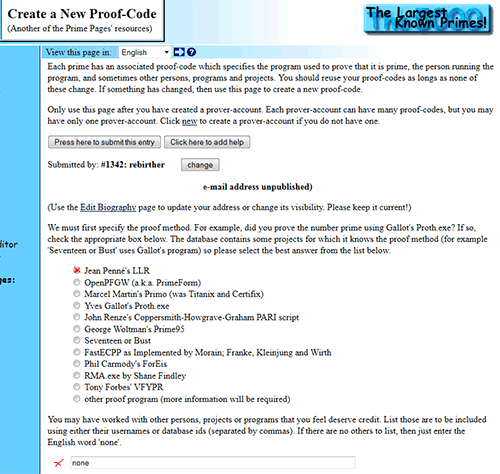
3. Enter the prime and submit.
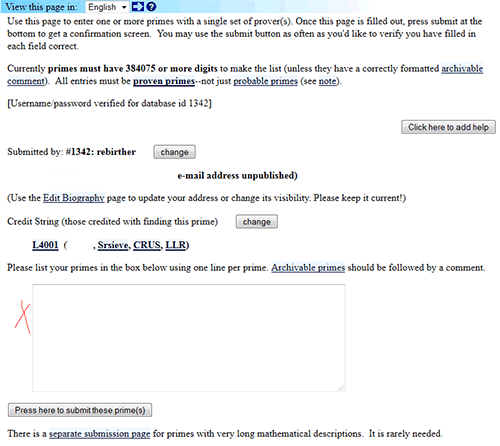
Currently primes must have a minimum of 926923 digits to get into the list
Reporting primes
The project will only reporting primes with bases <100k's left except it is a t5k. You will find them in the base results and the primelist.
/ rebirtherVolunteer moderator
Project administrator
Project developer
Project tester
Project scientist
Send message
Joined: 2 Jan 13
Posts: 8651
Credit: 251,421,613
RAC: 0
Hardware requirements
non AVX AMD/Intel CPU 2.3Gh+
Recommended:
AVX,AVX2/FMA3, AVX512 compatible AMD/Intel CPU 2.3Ghz+
AVX2/FMA3/AVX512 (producing more heat on your CPU, you need a really good cooling! Don't run the CPU if you have 90°C+ core temp (based on the CPU model).
/ rebirtherVolunteer moderator
Project administrator
Project developer
Project tester
Project scientist
Send message
Joined: 2 Jan 13
Posts: 8651
Credit: 251,421,613
RAC: 0
Apps runtime
short/standard -->sec-2h30min
average -->40min-6h
long -->3h+ (up to 10h+)
*Based on an i7-7800x@3.9Ghz with AVX.
List of apps:
srbase = Sierpinski / Riesel Base
srbase2 = Riesel Base
srbase3 = Sierpinski Base
srbase4 = Sierpinski / Riesel Base - short
srbase5 = Sierpinski / Riesel Base - long
srbase6 = Sierpinski / Riesel Base - average
srbase7 = Riesel Base - short
srbase8 = Sierpinski Base - short
srbase9 = Sierpinski / Riesel Base - average2
srbase10 = Sierpinski / Riesel Base - average3
srbase11 = Sierpinski / Riesel Base - long2
srbase12 = Sierpinski / Riesel Base - long3
TF = TF (GPU only)
LL-dc = LL-dc (GPU only)
/ rebirtherVolunteer moderator
Project administrator
Project developer
Project tester
Project scientist
Send message
Joined: 2 Jan 13
Posts: 8651
Credit: 251,421,613
RAC: 0
Invitation code
The invitation code for creating new accounts is pillepalle.
It's the best SPAM protection in BOINC. You only can create new accounts over the website.
/ rebirtherVolunteer moderator
Project administrator
Project developer
Project tester
Project scientist
Send message
Joined: 2 Jan 13
Posts: 8651
Credit: 251,421,613
RAC: 0
Multithreading / app_config.xml
srbase = Sierpinski / Riesel Base
srbase2 = Riesel Base
srbase3 = Sierpinski Base
srbase4 = Sierpinski / Riesel Base - short
srbase5 = Sierpinski / Riesel Base - long
srbase6 = Sierpinski / Riesel Base - average
srbase7 = Riesel Base - short
srbase8 = Sierpinski Base - short
srbase9 = Sierpinski / Riesel Base - average2
srbase10 = Sierpinski / Riesel Base - average3
srbase11 = Sierpinski / Riesel Base - long2
srbase12 = Sierpinski / Riesel Base - long3
Remove only the lines you don't need to run short apps.
Change the -tx commandline to use all of your cores you have / want to run.
/ rebirtherVolunteer moderator
Project administrator
Project developer
Project tester
Project scientist
Send message
Joined: 2 Jan 13
Posts: 8651
Credit: 251,421,613
RAC: 0
Trial Factoring
GPU Trial Factoring of Mersenne Prime candidates
- checkpoints are working every ~1min+ (depends on your GPU card)
- after a restart you will notice a 0 elapsed time, don't worry. You can always check your stderr.txt file where you are at current state
- GPU max WUs in progress limit = 50
available apps:
- Windows / Linux 64bit opencl for AMD cards, CUDA for Nvidia cards, IntelARC
Running mfakto (opencl)
- min_opencl_version 1.1
- support up to 9xxx
- support INTEL ARC (B580+)
* 1 full CPU core needed
Running mfaktc (CUDA)
- CUDA10
- driver >= 410.48
- CUDA11
- driver >= 450.80.02
- CUDA12
- driver >= 525.00
ARM apps
- no multi-GPU support yet, always running on -d 0
Badges


Runtime 100-1000M range (GPU work)
70-71 bit - done
71-72 bit - done
72-73 bit - done
73-74 bit - done
74-75 bit - done
75-76 bit - done
76-77 bit - 3h49min (@RX5500 XT/203M)
77-78 bit -
78-79 bit -
79-80 bit -
80-81 bit -
81-82 bit -
82-83 bit -
83-84 bit -
84-85 bit -
cc_config.xml
Disable iGPU
Multi-GPU
Solution to run on any Device for another project:
cc_config.xml must be put in the BOINC data directory.
/ rebirtherVolunteer moderator
Project administrator
Project developer
Project tester
Project scientist
Send message
Joined: 2 Jan 13
Posts: 8651
Credit: 251,421,613
RAC: 0
LL-dc
double-checks Lucas-Lehmer work
- checkpoints are working every ~2min+- (depending on your GPU card)
- after a restart you will notice a 0 elapsed time, don't worry, you always can check your stderr.txt file where you are at current state
- GPU max WUs in progress limit = 1
- deadline = 12d
available apps:
- Windows / Linux 64bit opencl for AMD and Nvidia cards
Requirement:
- cl_khr_fp64
- min_opencl_version 2.0
* x% of 1 CPU core needed
Supported cards:
- AMD: 5500+
- nvidia 1050+
cc_config.xml
Disable iGPU
Checking estimated runtime
- open slot folder and check stderr.txt with the 2nd ETA value
Reducing log iterations
or replace plan_class
Put the app_config.xml file in the project folder
app optimizations
It is possible to get a speedup up to ~40% depending on your card.
1. run -tune in a separate folder with prpll.exe -tune, can take up 20-60min
2. copy from a new config.txt line into the app_config.xml
# New settings based on a -tune run.
-use LOADS=1000,STORES=1,MODM31=2 //sample
estimated runtimes
A2000 - 71h
A4000 - 45h
1060 - 120h
1080 - 104h
1650 - 73h
2070 - 26h
3050 - 46h
3060 - 25h
3080 - 15h
4060 - 25h
4060ti - 19h //after -tune 10,8h
4070 - 11h
4080 - 7,4h //after -tune 4,8h
4090 - 5h
5060 - 15h //after -tune 9,5h
5070 - 13h (win)/11h (linux)
5070ti - 8,2h (win) //after -tune 4,9h
5080 - 7,5h
5090 - 5.1h
5500 - 68h //after -tune 51h
5700 - 38h
6600 - 39h
9070 - 17h //after -tune 13,4h
VII - 13,3h
Badges


 /
/